
Shadps4 Emulator
Shadps4 is a PS4 Emulator that can be found here(this is a fork recommended for Bloodborne). This emulator is a useful tool for practicing Bloodborne speedruns. As of now Emulator runs are NOT ALLOWED on the leaderboards but as the loading screens for Bloodborne are particularly terrible this is still very useful and can save tons of time when practicing. Be aware that Bloodborne emulation is still in its early life so do not expect anything to run perfectly and expect having to tinker with settings.
DISCLAIMER: It should be obvious but SoulsSpeedruns DOES NOT CONDONE PIRACY. Please do not ask us where to find copies of Bloodborne.
Emulation Guides
30 FPS Bloodborne on Shadps4 guide:
Please note this is not guaranteed to work flawlessly. It is just a brief guide to maybe help some people and may become outdated. This can also apply to 60 fps but since this is primarily a tool for practicing speedruns I focus on 30. This guide is for windows.
Step 1: Install the diegolix29 fork(recommended for BB) or normal version of shadps4 setup your paths and such. For both of these you want the "win64-qt" versions for windows. I recommend installing to your fastest drive like an NVME or SSD. You may need Microsoft Visual C++ redistributables if you don't already have them.
Step 2: Source the game yourself. Install the game and the update. When finished it should be version 1.09 and named something that starts with "CUSA". Not sure if it matters but try running the game before proceeding.
Step 3: Install BB Launcher. It makes this all a lot simpler in my opinion and it is what I am using in this guide.
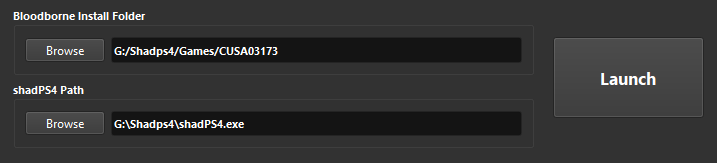
- Move the BB_Launcher.exe from the zip file into your Shadps4 folder or install using the alternate way described on the nexus page. On open it will prompt you to locate your shadps4 exe.
- Set your Bloodborne install folder on BB Launcher, this will be the "CUSA" folder in the shadps4 folder.
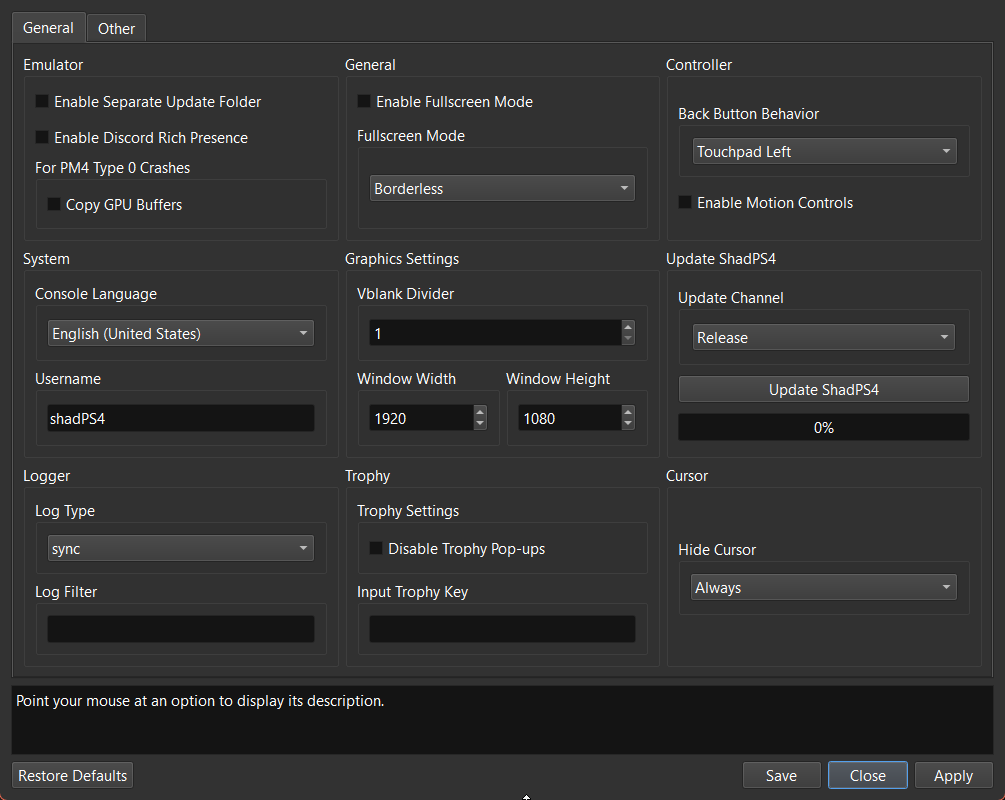
- Click Shadps4 settings, Keep VBlank Divider at 1, Set resolution to what you want but I recommend 1080p or 720p. Going higher than 1080p resolution is not recommended at all and requires better specs,Set log type to Sync, Disable motion controls.
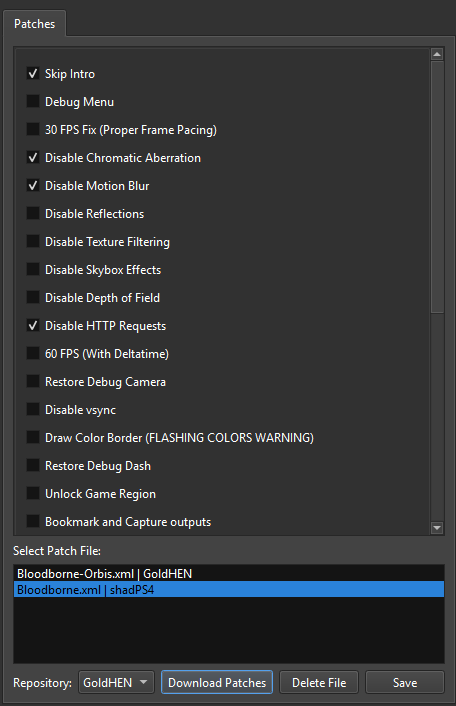
- Click Bloodborne Patches, Switch repository from GoldHEN to shadPS4, Hit Download patches, Check Skip intro, disable HTTP requests,disabling motion blur and chromatic aberration is recommended but not necessary, the rest is up to you but remember the 30 fps fix causes a lot of input lag. Make Sure to hit SAVE.
Step 4: The two mods Reduced Physics & Vertex Explosion Fix are recommended as of now for helping run the game somewhat smoothly. For Reduced Physics I recommend the Half Cloth version. I will explain how I setup these mods below. There is also an Intel and AMD crash fix listed in the recommended mods below but it is not always necessary.
- On BB Launcher clicks the MODS folder icon. Create two folders one for each mod.

- Now open your mods you downloaded and place the contents into each corresponding folder. If you do this wrong the activation wont work.
- If the mod has a folder named dvdroot_ps4 you want to put the contents of this folder into the corresponding mod folder you created. Such as for Vertex explosion you want to drag this folder into the folder you just made.
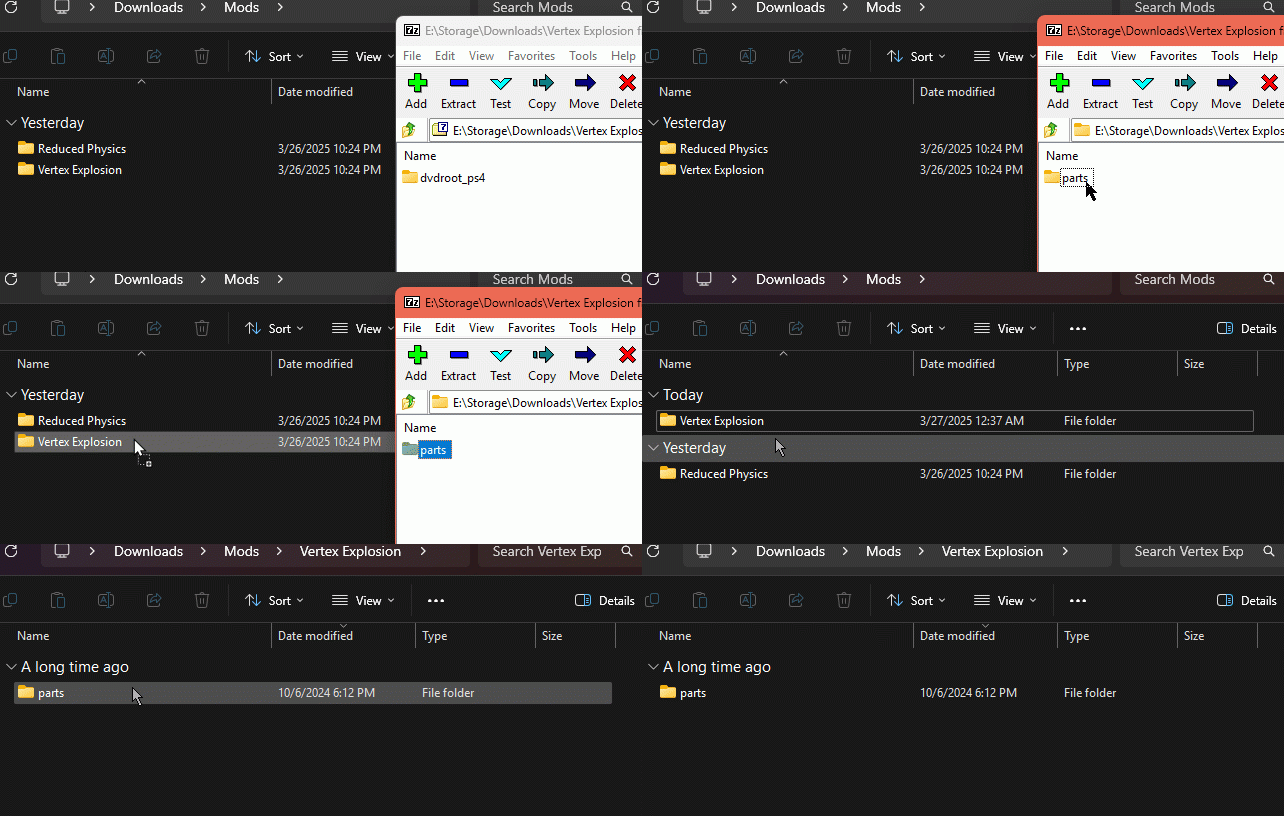
- Do the same for Reduced Physics, copy all the folders in the zip file into the Reduced Physics folder you made. These are the folders to copy

- Once the files are in their folders exit the folder and open Mod Manager in BB launcher. Activate each mod. If you get an error that mentions dvdroot_ps4 you didn't do the previous step correctly.
This should be all you need to get somewhat up and running. Ask in discord for more help but again do not ask where to source a copy of Bloodborne as we cannot help. Also most of us are learning as we go and the Emulator is new so check out other guides like the one below to maybe help(which I used a lot to make the one here). Explore the Bloodborne Nexus as well if you want.
Other Guides:
How to setup Bloodborne on ShadPs4Using SoulsSpeedruns - Save Organizer with the Emulator
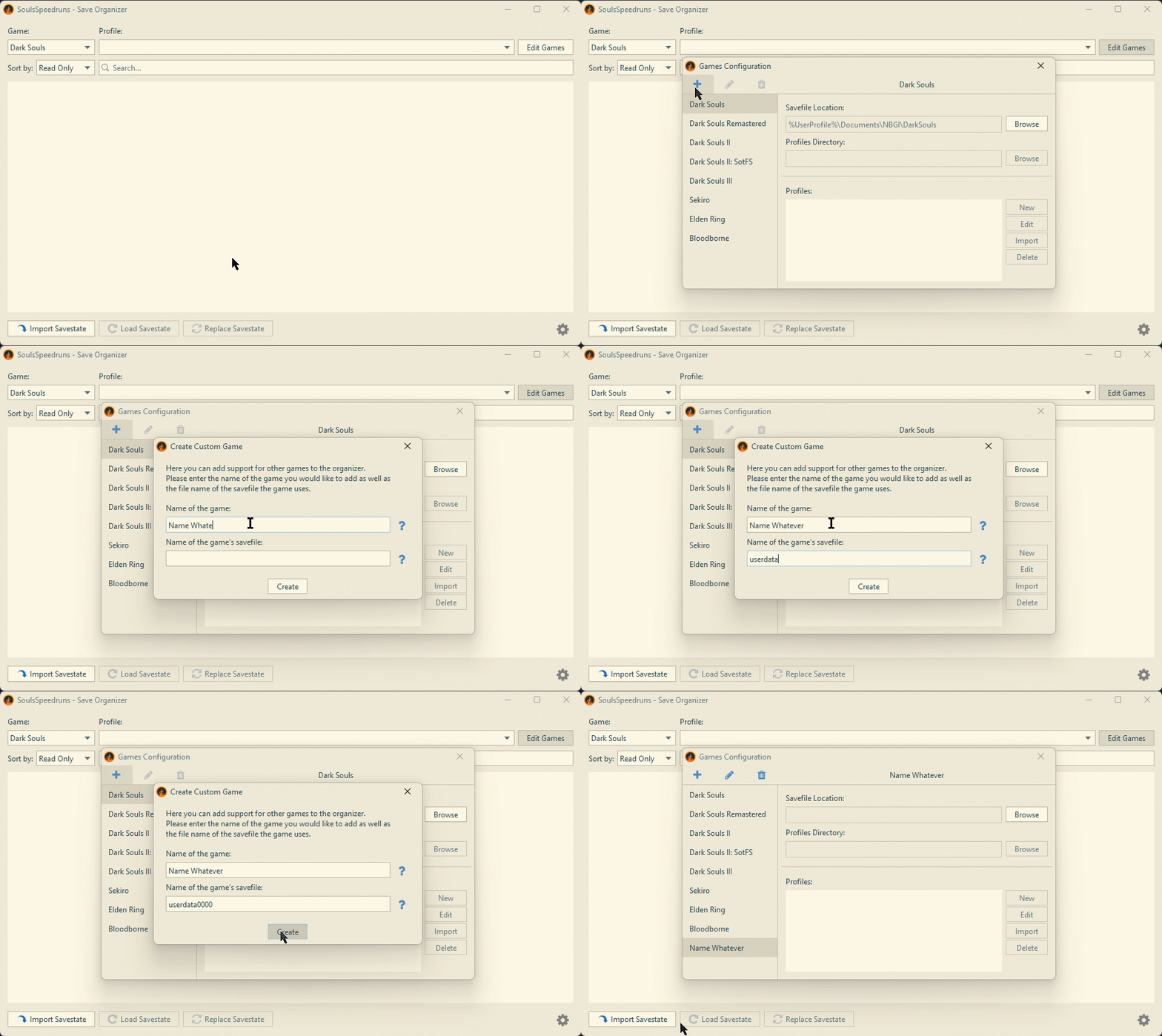
Adding the Game to the Save organizer:
Name of the game can be anything
Game Savefile is named "userdata0000"
Setting up the paths and profiles:
Browse to your savefile location which should look similar to this:

Profile Directory can be anywhere (and named anything) you want but preferably in its own folder and not in the same directory as the saves for the game.

After this just make a new Profile and name it whatever you like.
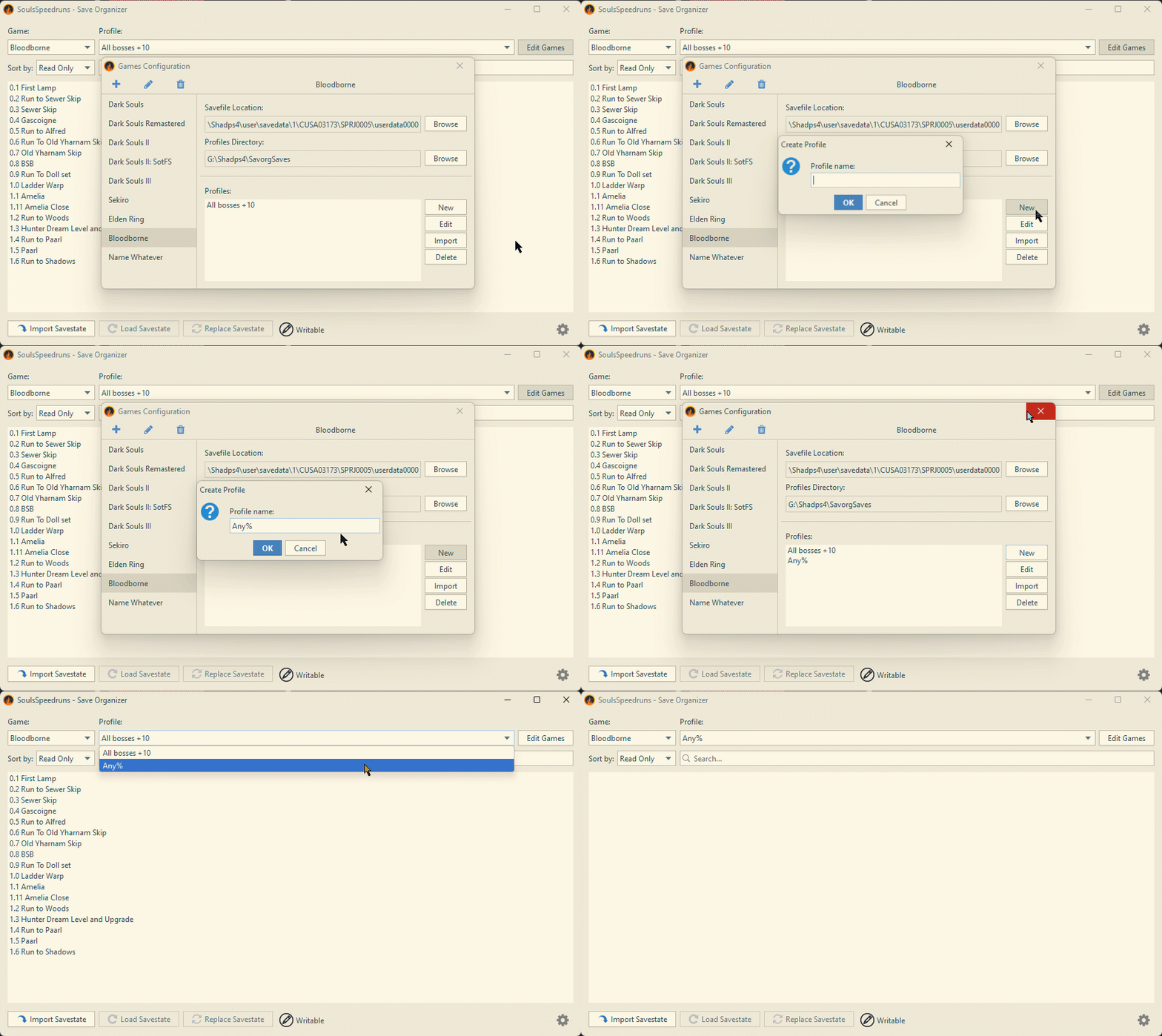
To actually make the saves you just use the buttons like you would for any other souls game.
Make sure to quitout before importing and loading.
FAQ
Q."My saves disappeared after a shadps4 update. Where did they go?"
A. Shadps4 is probably storing your save data under a new ID instead of the one you originally used (ie. CUSA00207). To fix this you just need to change the Savefile location to the new folder in Save Organizer.
Locate Your Original Save Folder: Go to one of these IDs using this path: shadPS4\user\savedata\1
or
C:\Users...\AppData\Roaming\shadPS4\savedata\1
And look for one of the following folders:
CUSA00208
CUSA03173
CUSA01363
CUSA00900
CUSA03023
CUSA03179
My folder's looked like this:
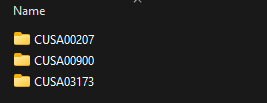
Copy your entire SPRJ0005 folder (located in the CUSA folder) from where your saves originally are stored into the new folder. For example mine was CUSA03173 and with the update it now is reading files from CUSA00207. Paste the SPRJ0005 into CUSA00207. Then change the path in Save organizer to the userdata0000 in the .../CUSA00207/SPRJ0005/ folder (you can see this above in the Save Organizer section). This should get everything back up in running. If having trouble just ask in the discord.
Recommended and potentially helpful mods
BB Launcher Reduced Physics Vertex Explosion FixBright Object Flash Fix (mainly for 1000 series GPUs and under)
Bloodborne Downscaled Intel 12th Gen and AMD crash fix Another Intel Fix